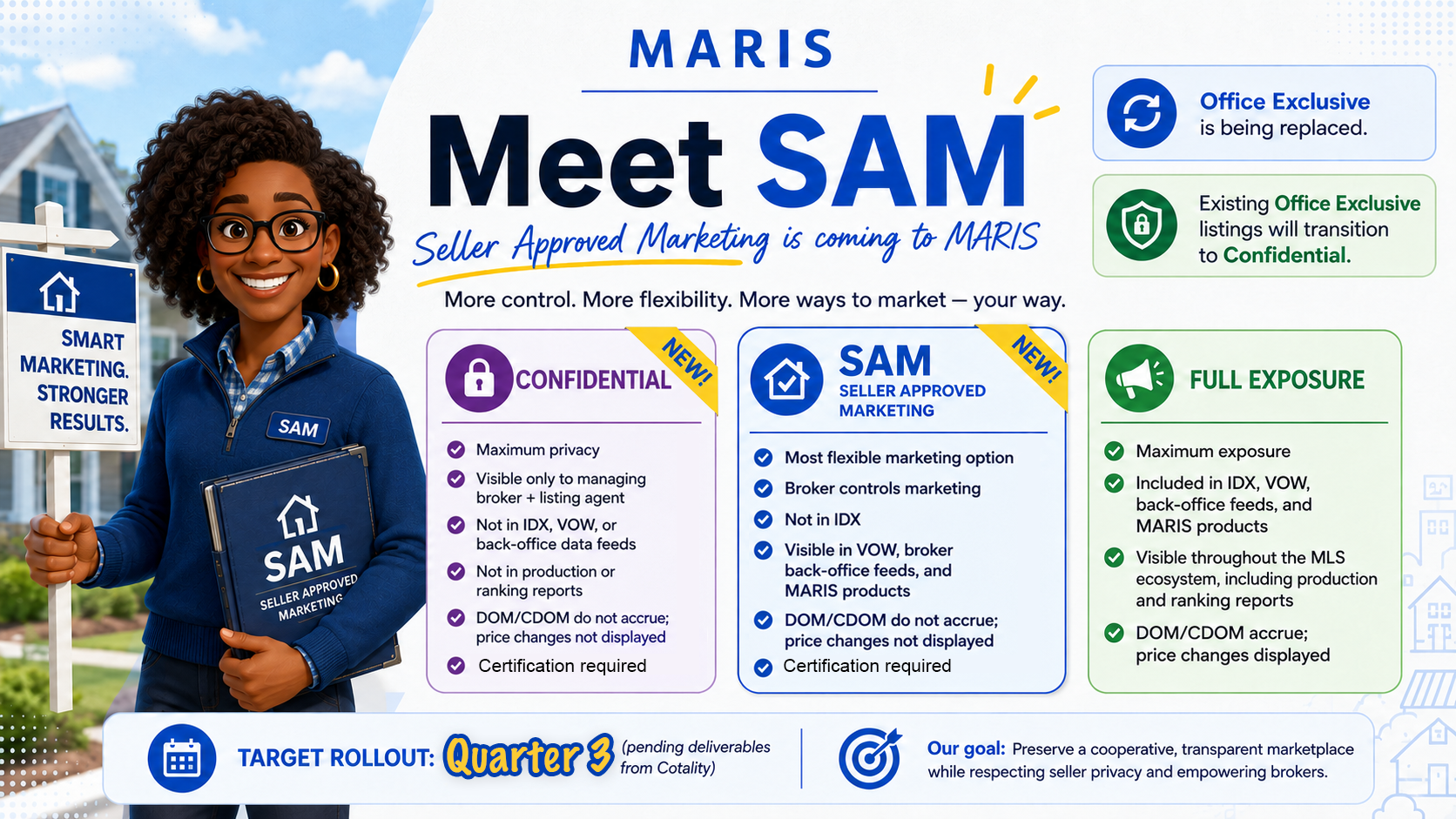
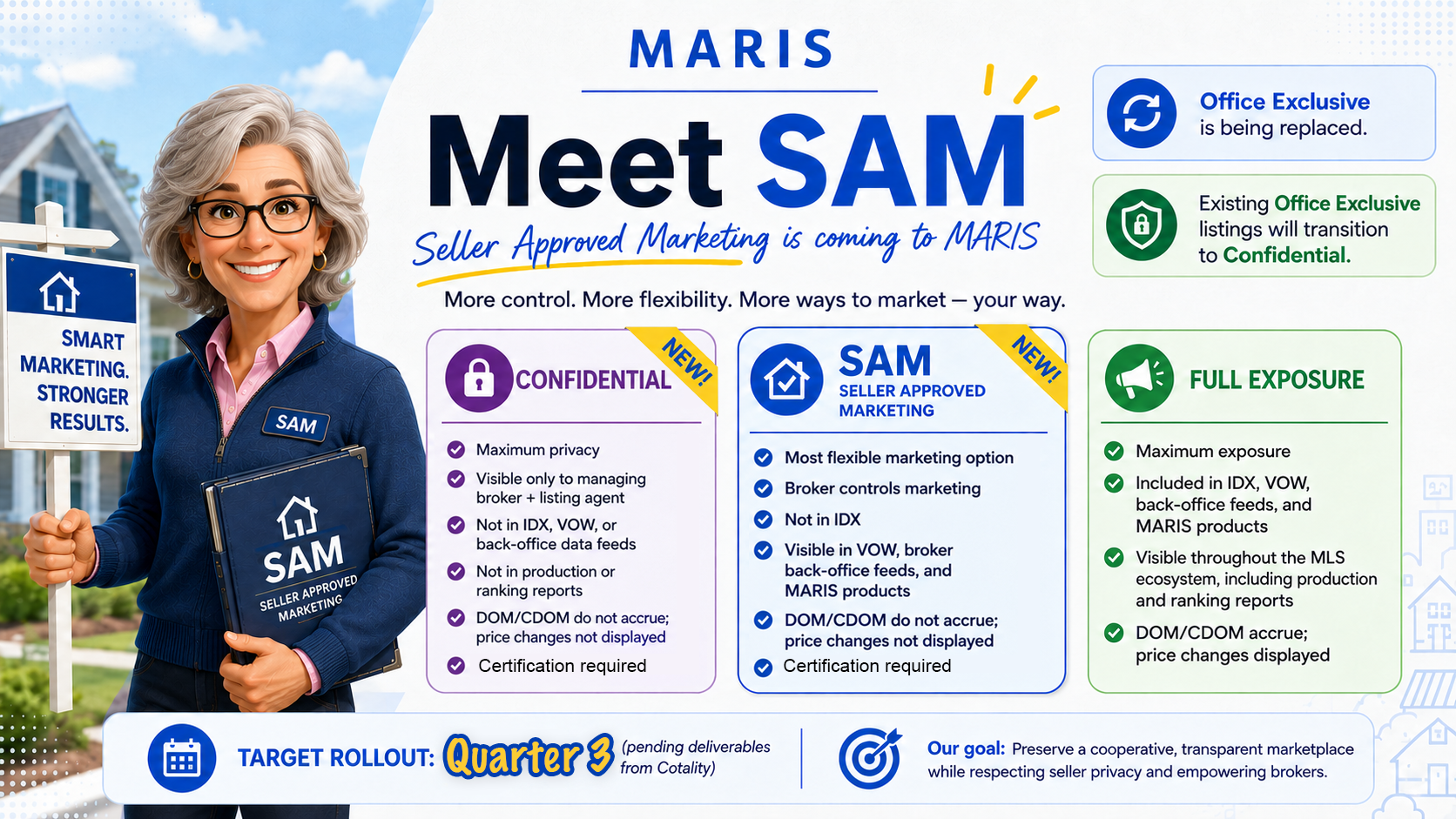
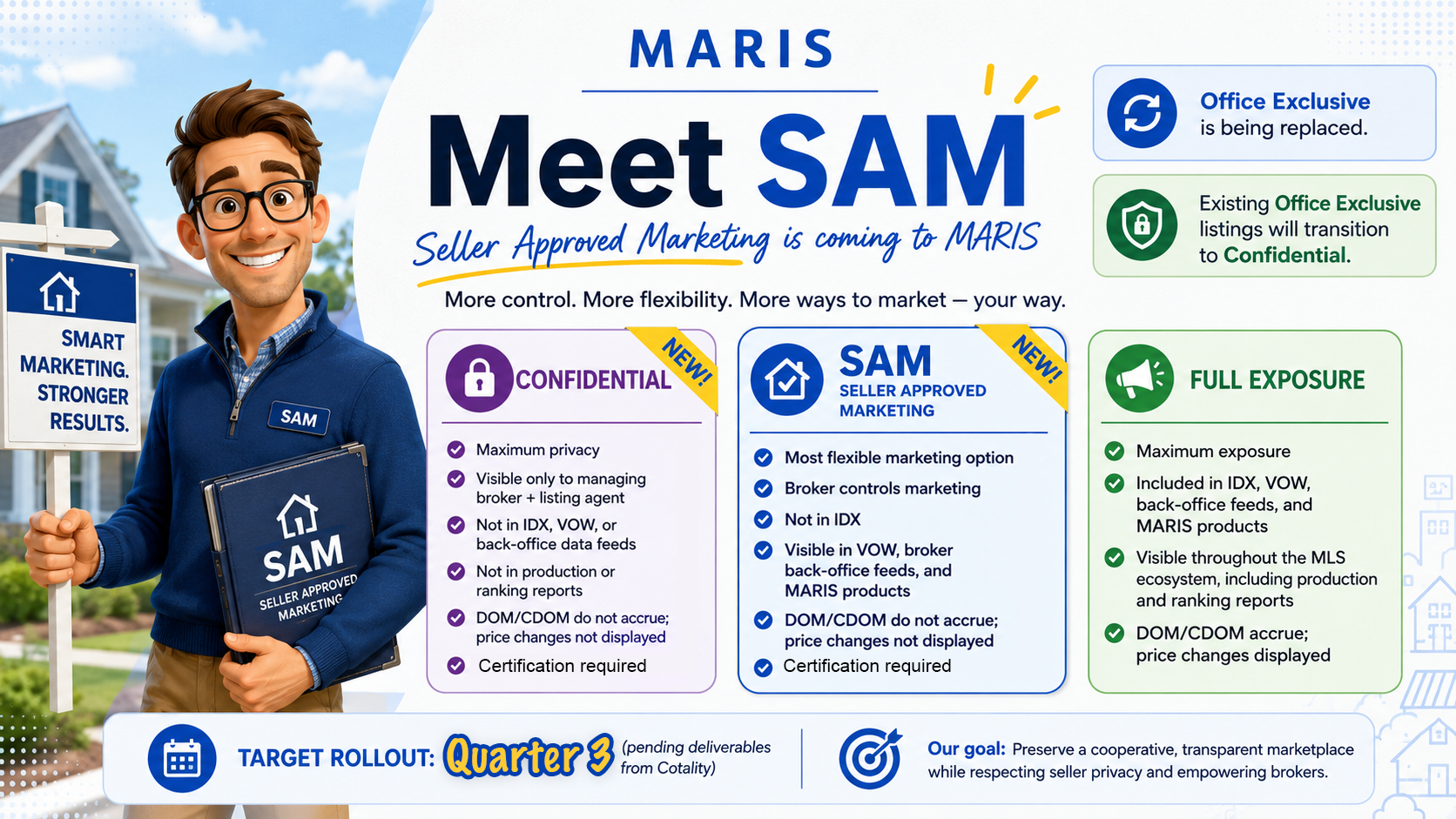
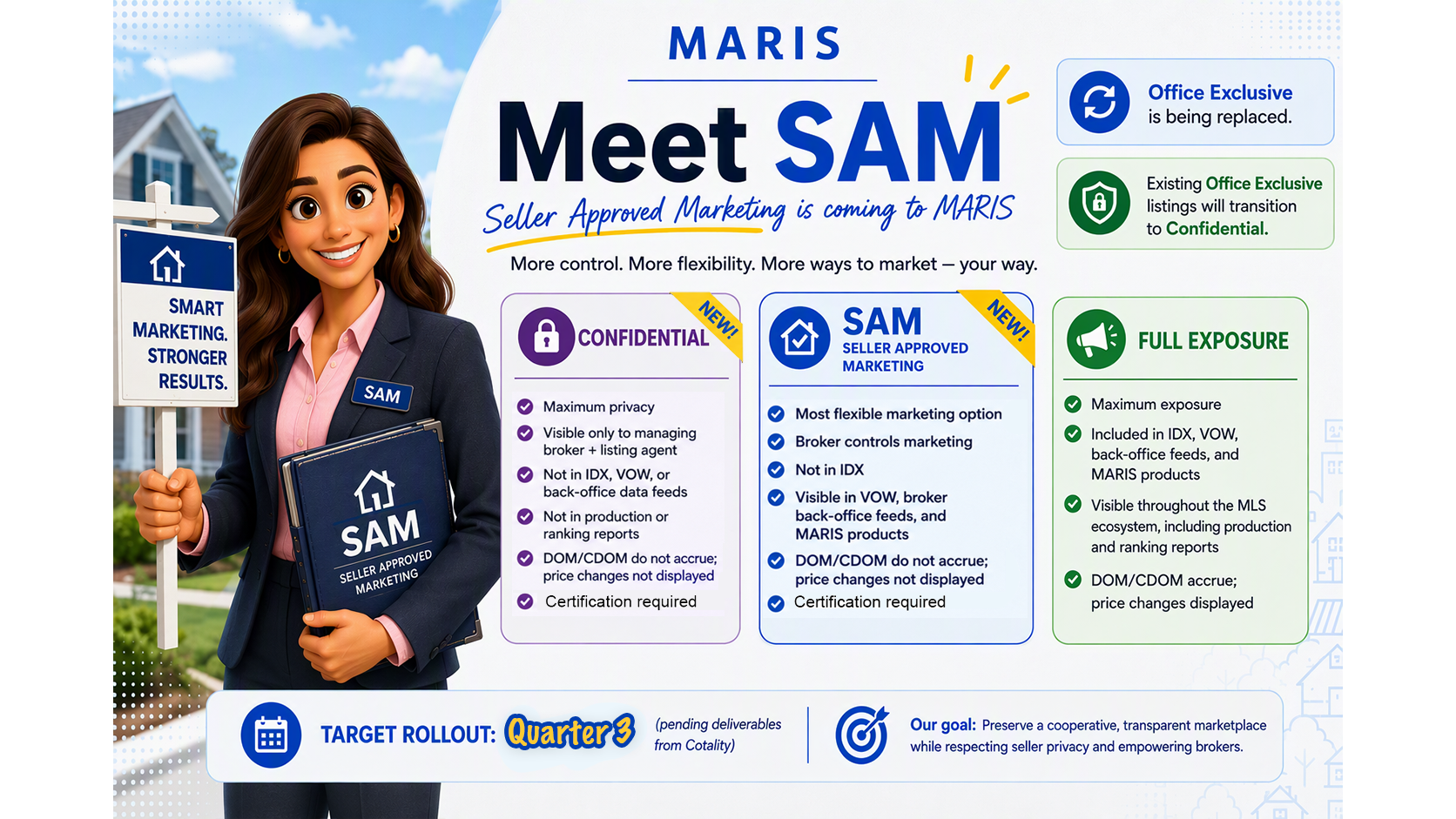
Understanding “Seller Approved Marketing” (SAM) and “Confidential” Visibility Options
A New Marketing Option Between Full Public Exposure and “Confidential” Listings
(Updated 9/21/26)
Section Links:
- Why MARIS Created Seller Approved Marketing
- How Seller Approved Marketing Works
- How SAM Differs from "Confidential" Listings
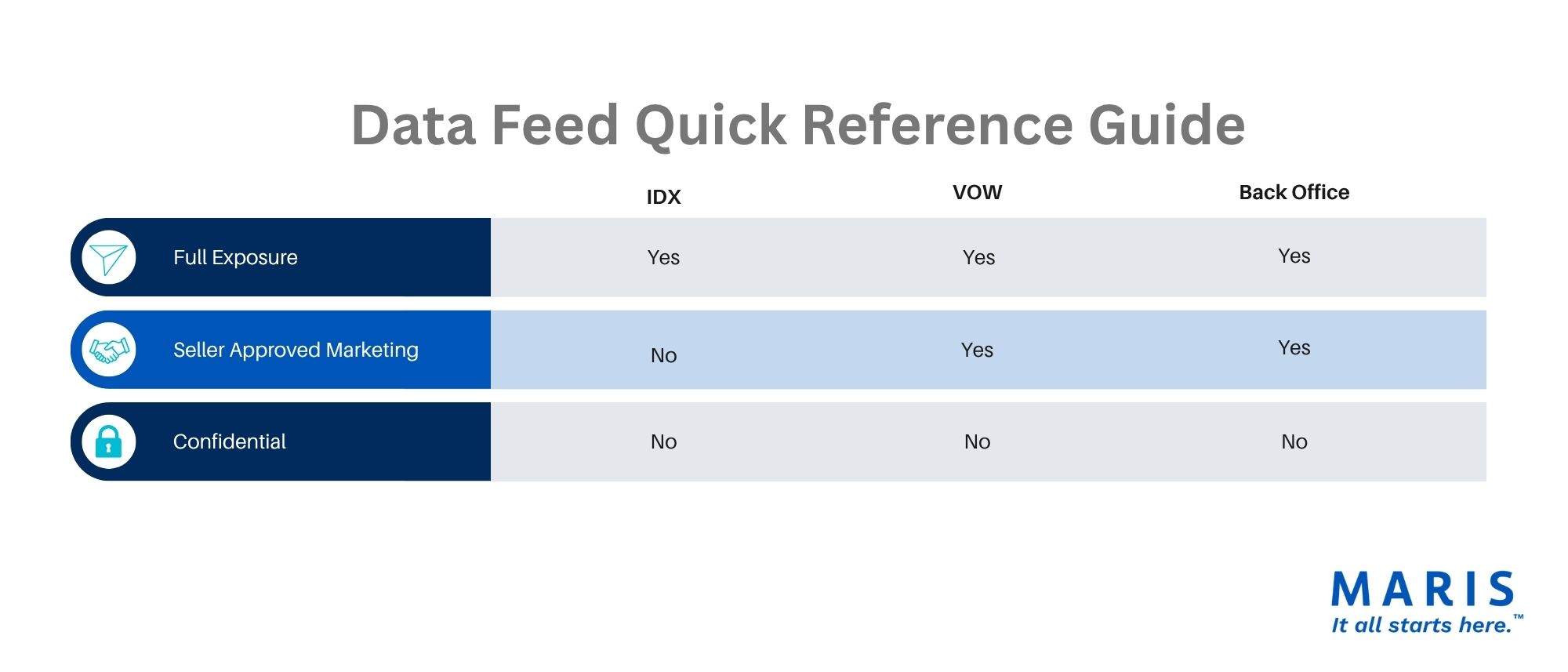
- Understanding IDX,VOW, and Back-Office Feeds
- How IDX, VOW, SAM, and "Confidential" Work Together
- Understanding the Difference Between a Status Option and an Exposure Level
- Media Privacy Visibility Update
- Frequently Asked Questions
- Take a Class
- Introduction Meeting Graphics
Not every seller wants maximum public exposure on day one. Whatever their motivations, Seller Approved Marketing (SAM) gives brokers and sellers another option.
SAM enables a listing to be entered into the MLS and shared with MLS participants, while giving flexibility to the listing broker over how broadly it will be distributed to public websites.
Why MARIS Created Seller Approved Marketing
When reviewing how the “Office Exclusive” category was being used, MARIS identified several uses more related to marketing than privacy. Listings waiting for photographs or for the house to be painted, for instance, were being placed in “Office Exclusive” - which limited visibility and a true picture of the marketplace. Our goal is to preserve the cooperative marketplace for timely, accurate, comprehensive, and transparent listing data while ensuring the ability to meet the seller’s privacy needs.
“Seller Approved Marketing” was developed to:
Give sellers more choice in how their property is marketed
Response to Agent/Broker concerns
Provide privacy capability within the framework of the cooperative marketplace and Participant Agreement.
Reduce marketplace data fragmentation
Maintain compliance with National Association of REALTORS policies
In short, SAM provides marketing flexibility while keeping listings transparent to real estate professionals relying on the MLS marketplace.
How "Seller Approved Marketing" Works
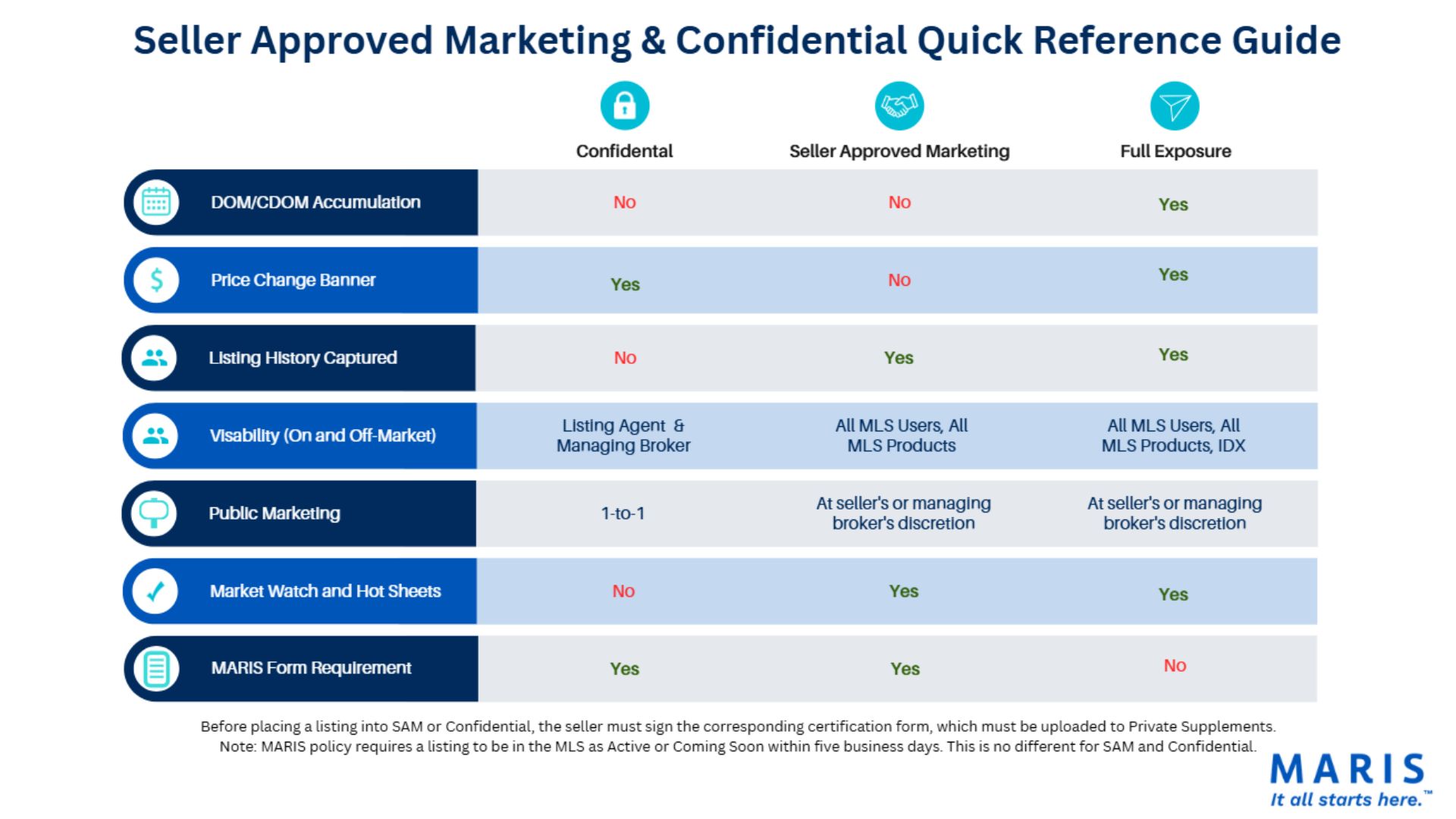
A SAM listing is visible within the MLS and visible to MLS participants.
SAM listings will:
Show in Matrix
Show in Market Watch and Hot Sheets
Shows in the Virtual Office Website (VOW) data feed
Be included in market reports
Not track Days on Market (DOM) and Cumulative Days on Market (CDOM)
Does not track price changes
Show in ShowingTime, MarketStats, RentSpree, and TrustFunds
SAM listings will not:
Be distributed through IDX feeds to public real estate websites.
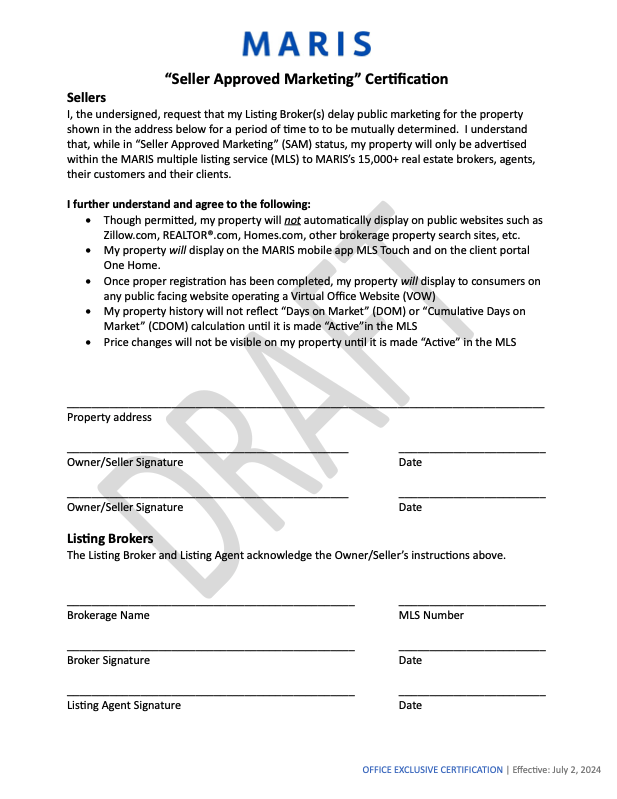
Before placing a listing into SAM, the seller must sign a Seller Approved Marketing Certification, which must be uploaded to Private Supplements.
|
|
Note: MARIS rules and regulations require a listing to be in the MLS as “Active” or “Coming Soon” within five business days, regardless of the exposure level. As an exposure level option, SAM listings are listed as “Coming Soon” or “Active.”
How SAM Differs from “Confidential” Listings
“Confidential” listings are designed for situations where the seller requests a much higher level of privacy.
A “Confidential” listing:
“Confidential” listings are visible only to the managing broker and listing agent
“Confidential” listings will not be visible in Market Watch, Hot Sheets, or production reporting
“Confidential” listings are not distributed through IDX, VOW, or broker back-office feeds
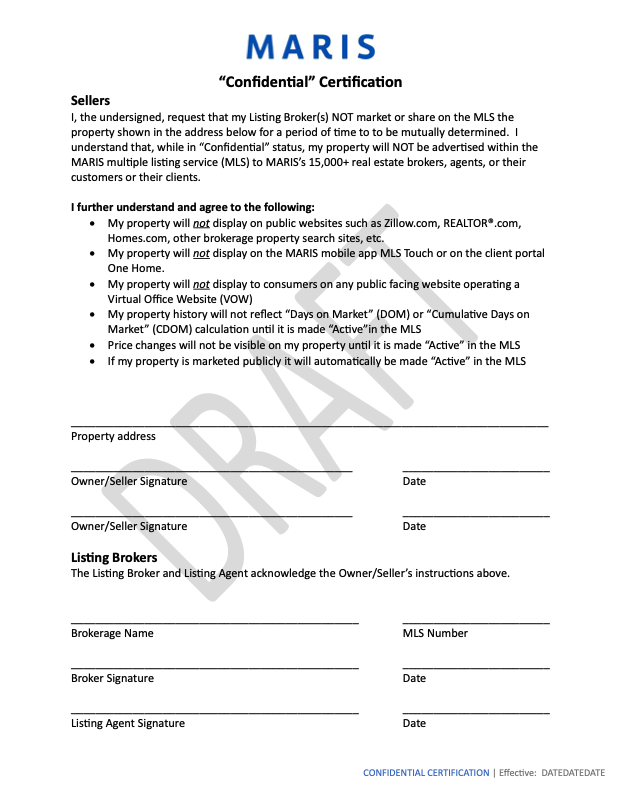
“Confidential” listings require seller certification and re-certification every 60 days
A SAM listing, by comparison, remains visible to MLS subscribers and their clients, while adding choice of public marketing exposure.
Simplified Comparison
"Confidential"
Maximum privacy
Visible only to the listing broker and listing agent
Not included in IDX, VOW, or back-office feeds
Not included in production and ranking reports
"Seller Approved Marketing"
Broker-directed public exposure
Visible throughout the MLS ecosystem, including production and ranking reports
Not included in IDX feeds to broker websites
Included in the VOW, back-office feeds, and MARIS products
Included in Production and Ranking reports
Understanding IDX, VOW, and Back-Office Feeds
To understand SAM, it helps to understand the difference between MLS data feeds, and how and where they provide MLS data.
What Is IDX?
Internet Data Exchange (IDX),often called Broker Reciprocity, is the agreement between brokers that allows them to display one another's listings on public-facing websites.
When consumers search listings on most brokerage websites without creating an account, they are viewing IDX data.
IDX is designed for public marketing and broad listing exposure.
What Is VOW?
A Virtual Office Website (VOW) is different.
VOWs require consumers to register and establish a relationship with a brokerage before accessing listing information.
VOW is designed for registered consumer relationships rather than anonymous public browsing.
What are Back-Office Feeds?
Back-office feeds are an unrestricted data stream used to power broker products and services, for non-public use within the brokerage, e.g., agent production and analytics, internal software integrations.
How IDX, VOW, SAM, and "Confidential" Work Together
Understanding the Difference Between A Status Option and an Exposure Level
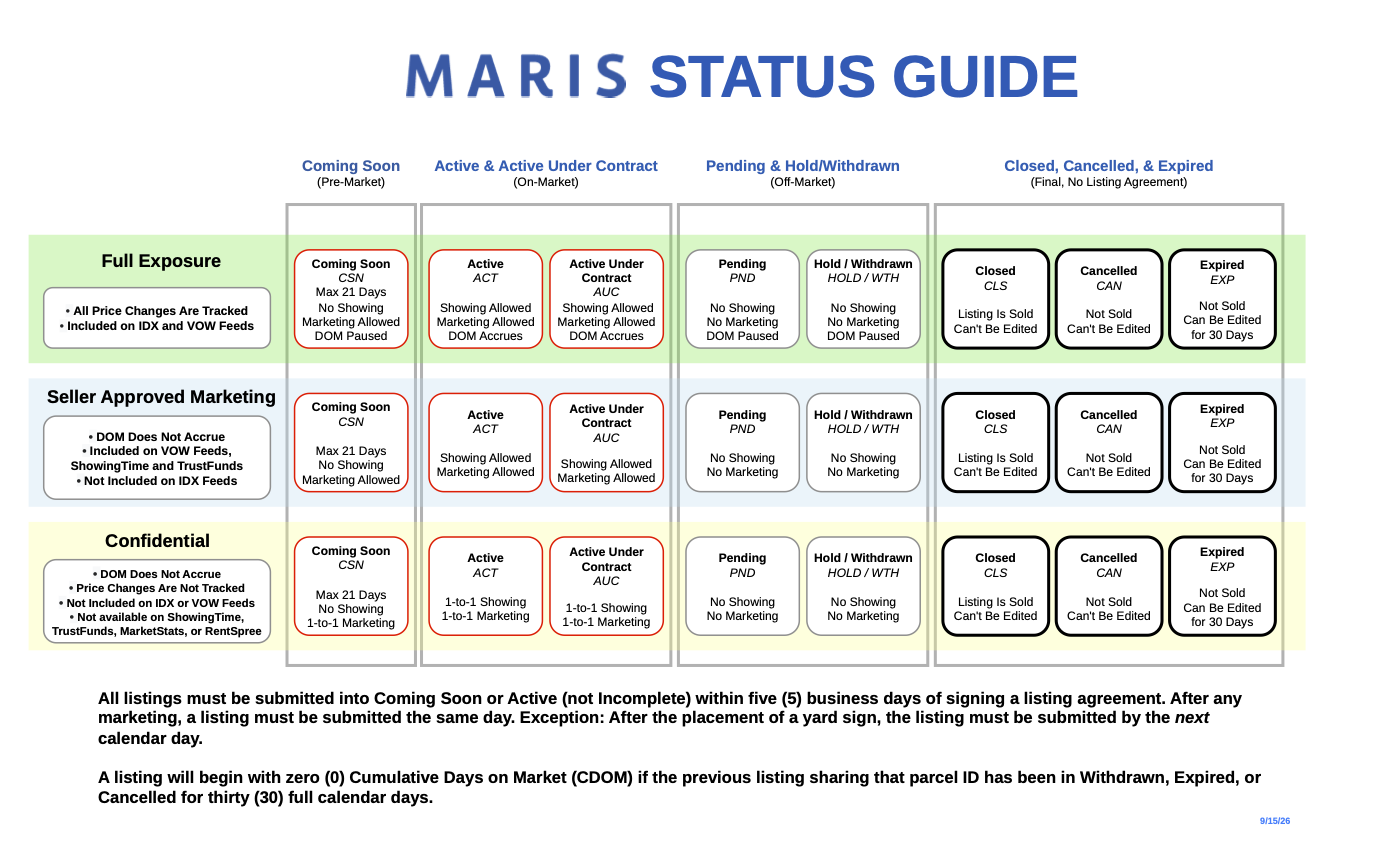
A status in the MLS is not the same as an exposure level.
A status is how a listing moves through the market. (E.g., “Coming Soon” to “Active” etc.) You can find a helpful sheet on all our statuses here.
An Exposure Level determines where a listing is displayed (SAM and "Confidential".) You can find a helpful chart for data feed exposure levels here, and a helpful quick reference guide for SAM and "Confidential" here, for downloading. You can also see them below.
Media Privacy Visibility Update
With the release of Seller Approved Marketing (SAM) and Confidential Listings, the definitions of Media Privacy visibility settings are changing. The comparison below outlines both the current and upcoming functionality.
Current Visibility Definitions | Updated Visibility Definitions | |
| Private: Supplements are visible to MLS subscribers. This serves as the current system default. | Private: Supplements are visible only to the listing Agent and managing broker. This will be the system default. | |
| Public: Supplements are visible to MLS subscribers and syndicate to MLS-Touch and OneHome users. | Public: Supplements are visible to MLS subscribers. This matches the current default behavior. | |
| Conditional: Supplements remain Public while the listing is not in an off market status (Expired, Cancelled, Withdrawn, or Closed). When the listing moves to an off-market status (Expired, Cancelled, Withdrawn, or Closed),the supplements automatically change to Private. | Conditional: Supplements remain Public while the listing is not in an off market status (Expired, Cancelled, Withdrawn, or Closed). When the listing moves to an off-market status (Expired, Cancelled, Withdrawn, or Closed),the supplements automatically change to Private, making them visible only to the listing Agent and managing broker. |
Reminder
Upload the Confidential Certification and Seller Approved Marketing Certification as Private supplements. Only the listing Agent and managing broker can view these documents.
The Confidential Certification requires a new signature and to be uploaded every 60 days.
Frequently Asked Questions
Does a SAM listing satisfy Clear Cooperation requirements?
Yes. Entering a listing into “Seller Approved Marketing” satisfies Clear Cooperation compliance requirements.
Will SAM listings appear in production and ranking reports?
Yes. SAM listings are included in production and ranking reporting.
Will "Confidential" listings appear in production and ranking reports?
No. "Confidential" listings are not included in production and ranking reporting.
Can a SAM listing appear on public-facing websites?
Yes. SAM listings may appear on public websites, but do not distribute through any MARIS data feeds.
Can I put my “Confidential" on public-facing websites?
No. “Confidential” listings are confidential. If you want to put your listings on a public-facing website, they will have to be entered either as Seller Approved Marketing or a full exposure listing.
Does SAM track DOM and CDOM?
No. SAM listings do not track Days on Market and Cumulative Days on Market.
Does "Confidential" track DOM and CDOM?
No. "Confidential" listings do not track Days on Market and Cumulative Days on Market.
Does a seller need to sign documentation for SAM?
Yes. Sellers must sign a Seller Approved Marketing Certification, which must be uploaded by the listing agent into “Private Supplements” in Matrix.
Can I place a "Confidential" listing into a private listing network?
No. Doing so would violate MARIS Rules and Regulations.
Take a Class
Upcoming classes
Introduction Meeting Graphics
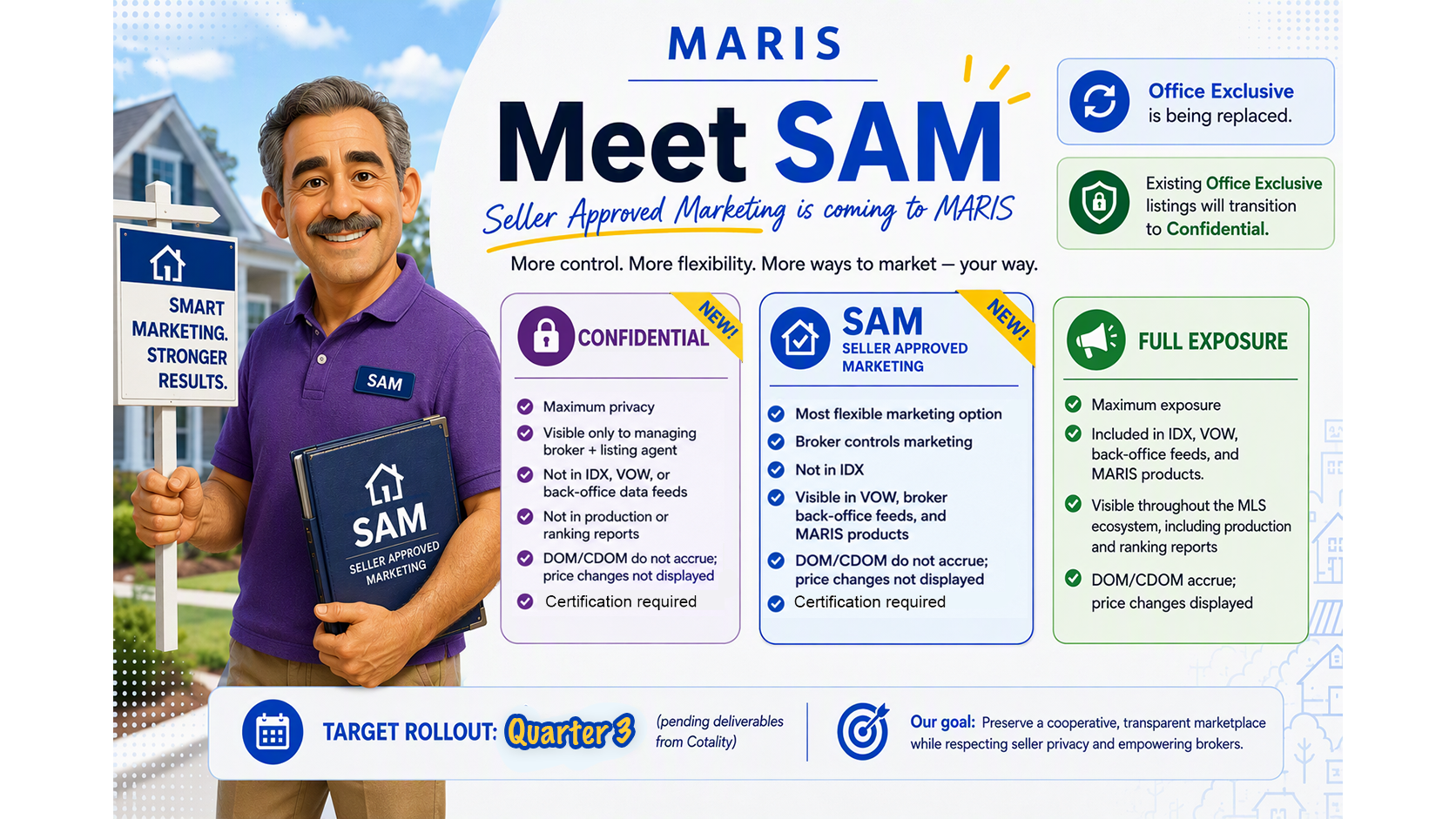
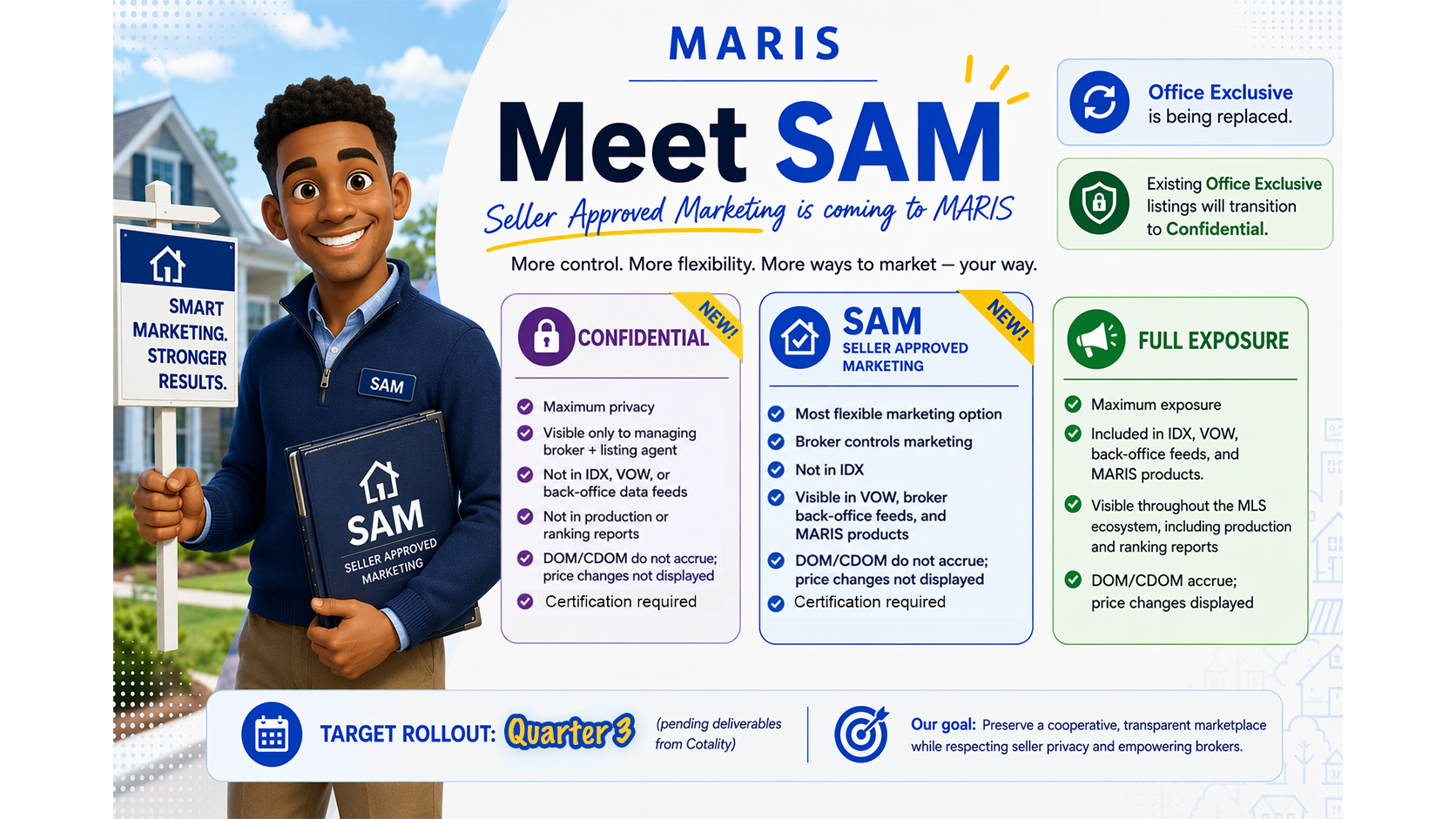
Download ready-to-use presentation graphics for "Seller Approved Marketing" (SAM) and "Confidential" for your next office meeting.