
MARIS MLS Status Guide and FAQ
Last Updated 9/15/26
Status Explanations:
Cumulative Days on Market (CDOM) Calculation
Visual Flowchart/Guide
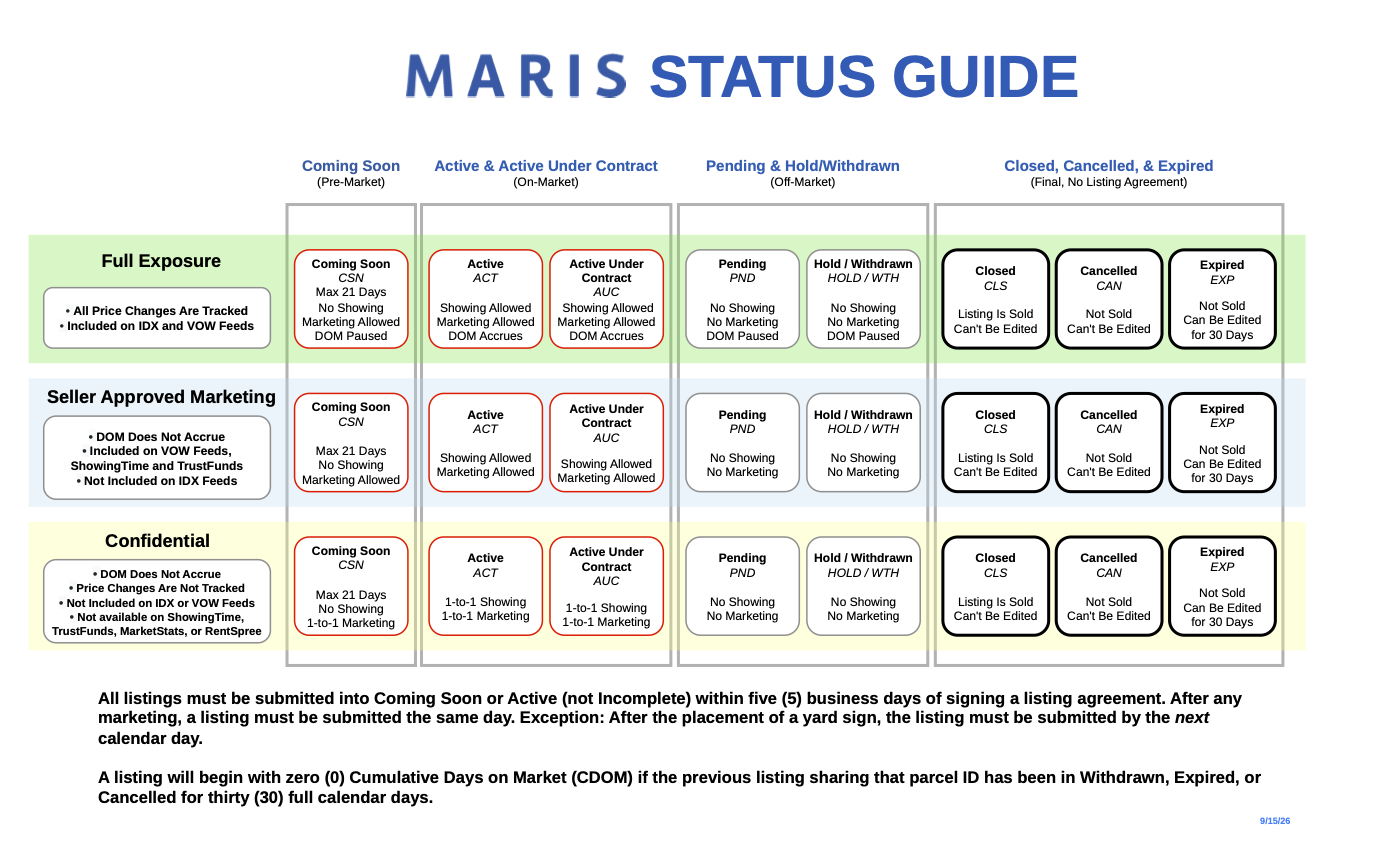
Incomplete
“Incomplete” status is a draft of a listing. It holds partial property details including photos and documents while you prepare to change the status to “Coming Soon” or “Active.”
- “Incomplete” status does not fulfill the requirement for entry within 5 business days; it must be entered to “Active” or “Coming Soon.”
- Public marketing is not allowed in this status.
- Showings and open houses are not permitted while a listing is “Incomplete.”
- Days on Market (DOM) and Cumulative Days on Market (CDOM) do not accrue while the listing is in “Incomplete” status.
- Next step status options:
- “Coming Soon”
- “Active”
- Special status comments pertaining to this status only:
- If a listing stays “Incomplete” for more than 90 days, it will be automatically deleted.
Coming Soon
“Coming Soon” status is for properties that are preparing for full marketing exposure as an “Active” status listing.
- All listings, including “Office Exclusive,” must be submitted within five (5) business days of obtaining all required signatures, or within one (1) business day after any public marketing begins.
- Public marketing is allowed while the listing is in “Coming Soon” status.
- “Coming Soon” listings are distributed to brokerage IDX and VOW feeds, third-party syndication platforms, and back-office feeds for internal brokerage products, unless the “Publish to Internet” option is set to “No.”
- Showings and open houses are not permitted while a listing is “Coming Soon.”
- At least one photo showing the front of the property must be uploaded within three (3) business days of entering the listing into any status other than “Incomplete” in Matrix. If multiple photos are provided, the front of the property needs to be within the photo set, and does not need to be the first photo.
- DOM and CDOM do not accrue while the listing is in the “Coming Soon” status.
- Next step status options:
- “Active”
- “Hold”
- “Canceled”
- “Withdrawn”
- Special status comments pertaining to this status only:
- Listings marked as “Coming Soon” will automatically switch to “Active” after 21 days or on the Expected Active Date chosen by the agent.
Active
“Active” status is for properties that are offered for sale and have no accepted contract.
- All listings, including “Office Exclusive,” must be submitted within five (5) business days of obtaining all required signatures, or within one (1) business day after any public marketing begins.
- Public marketing is allowed while the listing is in “Active” status.
- “Active” listings are distributed to brokerage IDX and VOW feeds, third-party syndication platforms, and back-office feeds for internal brokerage products, unless the “Publish to Internet” option is set to “No.”
- Showings and open houses are permitted while a listing is “Active.”
- At least one photo showing the front of the property must be uploaded within three (3) business days of entering the listing into any status other than “Incomplete” in Matrix. If multiple photos are provided, the front of the property needs to be within the photo set, and does not need to be the first photo.
- DOM and CDOM will accrue while the listing is in “Active” status.
- Next step status options:
- “Hold”
- “Active Under Contract”
- “Pending”
- “Canceled “
- “Withdrawn”
- “Expired “
- Special status comments pertaining to this status only:
- Once “Active,” a listing cannot be moved to “Coming Soon.”
Active Under Contract
“Active Under Contract” status is for properties that have an accepted contract, but the seller has instructed their agent to keep marketing and showing the property.
- Status must be updated to “Active Under Contract” within three (3) business days of the effective date of the contract amendment.
- Public marketing is allowed while the listing is in “Active Under Contract” status.
- “Active Under Contract” listings are distributed to brokerage IDX and VOW feeds, third-party syndication platforms, and back-office feeds for internal brokerage products, unless the “Publish to Internet” option is set to “No.”
- Showings and open houses are permitted while a listing is “Active Under Contract.”
- At least one photo showing the front of the property must be uploaded within three (3) business days of entering the listing into any status other than “Incomplete” in Matrix. If multiple photos are provided, the front of the property needs to be within the photo set, and does not need to be the first photo.
- DOM and CDOM will accrue while the listing is in “Active Under Contract” status.
- Next step status options:
- “Active”
- “Hold”
- “Pending”
- “Closed “
- “Canceled “
- “Withdrawn”
- ”Expired”
- Special status comments pertaining to this status only:
- Listings can remain in “Active Under Contract” up to 9 months after the Expiration Date.
- “With Kick-out”: For properties that have an accepted contract with a contingency that may allow the seller to terminate the current contract in favor of a backup contract.
- “Without Kick-out”: For properties that have an accepted contract, and the seller has instructed the listing broker to keep marketing the property in an effort to secure a backup contract, regardless of their ability to terminate the current contract.
Pending
“Pending” status is for properties with an accepted contract, and the seller has instructed their agent to cease marketing and/or showing the property, while normal contractual conditions are fulfilled (e.g., inspections, financing, etc.)
- The status must be updated to “Pending” within three (3) business days of the effective date of the contract amendment.
- Public marketing is not allowed while the listing is in “Pending” status.
- “Pending” listings are distributed to brokerage IDX and VOW feeds, third-party syndication platforms, and back-office feeds for internal brokerage products, unless the “Publish to Internet” option is set to “No.”
- Showings and open houses are not permitted while a listing is “Pending.”
- At least one photo showing the front of the property must be uploaded within three (3) business days of entering the listing into any status other than “Incomplete” in Matrix. If multiple photos are provided, the front of the property needs to be within the photo set, and does not need to be the first photo.
- DOM and CDOM do not accrue while the listing is in “Pending” status.
- Next step status options:
- “Active”
- “Hold”
- “Closed “
- “Canceled “
- “Withdrawn”
- ”Expired”
- Special status comments pertaining to this status only:
- Listings can remain in “Pending” up to nine (9) months after the expiration date.
Hold
“Hold” status is for properties that are not being marketed for a limited period of time but are still subject to a brokerage agreement and expected to return to “Active” status.
- Public marketing is not allowed while the listing is in “Hold” status.
- Listings will show as “Off Market” on all IDX/VOW feeds and 3rd party sites opted by the managing broker.
- Showings and open houses are not permitted while a listing is in the “Hold” status.
- At least one photo showing the front of the property must be uploaded within three (3) business days of entering the listing into any status other than “Incomplete” in Matrix. If multiple photos are provided, the front of the property needs to be within the photo set, and does not need to be the first photo.
- DOM and CDOM do not accrue while the listing is in “Hold” status.
- Next step status options:
- “Active”
- “Hold”
- “Canceled “
- “Withdrawn”
- ”Expired”
- Special status comments pertaining to this status only:
- There is no maximum time limit that a listing may be in the “Hold” status.
- The “Hold” status does not qualify to reset CDOM.
Closed
“Closed” status is for properties that have been sold/leased. For the purposes of updating MLS status, “closed” references the legal transfer of property and is not dependent on broker compensation being received.
- At least one photo showing the front of the property must be uploaded within three (3) business days of entering the listing into any status other than “Incomplete” in Matrix. If multiple photos are provided, the front of the property needs to be within the photo set, and does not need to be the first photo.
- Special status comments pertaining to this status only:
- Corrections or revisions while in the “Closed” status may only be made by MARIS staff. Email change requests to listingchanges@marismls.com.
- If a change to the selling agent information is requested within the same calendar year that the listing “Closed,” MARIS will process the update at no charge. The request must come with approval from either the listing agent, selling agent, or managing broker (from either side of the transaction). After the turn of a calendar year, a $25 fee will apply for each listing change. This is a per-listing charge, regardless of the number of changes made to that listing.
- Corrections or revisions while in the “Closed” status may only be made by MARIS staff. Email change requests to listingchanges@marismls.com.
Withdrawn
“Withdrawn” status is for properties “Withdrawn” from the system prior to expiration, but still subject to a listing broker agreement.
- Public marketing is not allowed while the listing is in “Withdrawn” status.
- Showings and open houses are not permitted while a listing is “Withdrawn.”
- At least one photo showing the front of the property must be uploaded within three (3) business days of entering the listing into any status other than “Incomplete” in Matrix. If multiple photos are provided, the front of the property needs to be within the photo set, and does not need to be the first photo.
- DOM and CDOM do not accrue while the listing is in “Withdrawn” status.
- Next step status options:
- “Active”
- Special status comments pertaining to this status only:
- Listings will remain in this status until moved by the system or listing agent to the “Expired” status.
- Listings can be edited while in this status.
- CDOM will reset only when a property has remained in "Closed," "Expired," "Canceled," or "Withdrawn" status for a minimum of thirty (30) consecutive days and is subsequently relisted; "Hold" status is excluded. Relisting prior to a full thirty (30) days prevents the reset, therefore relisting on day thirty-one (31) or later is recommended to ensure a successful CDOM reset.
Canceled
“Canceled” status is for properties that have a terminated listing agreement.
- Public marketing is not allowed while the listing is in “Canceled” status.
- Special status comments pertaining to this status only.
- These listings will not expire.
- CDOM will reset only when a property has remained in "Closed," "Expired," "Canceled," or "Withdrawn" status for a minimum of thirty (30) consecutive days and is subsequently relisted; "Hold" status is excluded. Relisting prior to a full thirty (30) days prevents the reset, therefore relisting on day thirty-one (31) or later is recommended to ensure a successful CDOM reset.
Expired
“Expired” status is for properties where the “Expiration Date” has been reached without a successful sale.
- Public marketing is not allowed while the listing is in “Expired” status.
- Showings and open houses are not permitted while a listing is “Expired.”
- At least one photo showing the front of the property must be uploaded within three (3) business days of entering the listing into any status other than “Incomplete” in Matrix. If multiple photos are provided, the front of the property needs to be within the photo set, and does not need to be the first photo.
- DOM and CDOM do not accrue while the listing is in “Expired” status.
- Next step status options:
- “Active”
- Special status comments pertaining to this status only:
- CDOM will reset only when a property has remained in "Closed," "Expired," "Canceled," or "Withdrawn" status for a minimum of thirty (30) consecutive days and is subsequently relisted; "Hold" status is excluded. Relisting prior to a full thirty (30) days prevents the reset, therefore relisting on day thirty-one (31) or later is recommended to ensure a successful CDOM reset.
- Note: The “Active” and “Hold” statuses will automatically expire on their expiration date. The “Pending” and “Active Under Contract” statuses are exceptions; they will expire 90 days after the expiration date. The “Coming Soon” status does not expire, but it will automatically change once the listing moves to “Active.
Office Exclusive "Y" or "N"
- The “Office Exclusive Certification Form” must be completed and signed by all required parties within five (5) business days from the listing contract date.
- All listings, including “Office Exclusive,” must be submitted within five (5) business days of obtaining all required signatures.
- Public marketing is prohibited whenever Office Exclusive is set to “Yes” regardless of the listing’s status.
- Access to ShowingTime, Trust Funds, MLS-Touch, MLS-Client/OneHome, or syndication is unavailable.
- Any Communication or Showings of “Office Exclusive” listings can only be on a 1-to-1 basis.
- DOM and CDOM do not accrue while the listing is in “Office Exclusive.”
- Special status comments pertaining to this option only.
- Price changes are not tracked.
- Once moved to Office Exclusive “No,” the listing cannot be changed back to Office Exclusive "Yes.”
- Office Exclusive listings cannot be deleted from the Service.
MARIS Rules Section 1.3 - Office Exclusive Listings If the seller refuses to permit the listing to be disseminated by the Service, the Participant may then take the listing and such listing shall be filed with the Service (under the Office Exclusive status) but not disseminated to the Participants. An Office Exclusive Certification form must be completed no later than five (5) business days following the contract’s execution date. The completed form must be maintained with all other listing documents related to the property. Upon request from MARIS, this form must be provided within one (1) business day. MARIS Rules Section 1.01 - Clear Cooperation Within one (1) business day of marketing a property to the public, the listing broker must submit the listing to the MLS for cooperation with other MLS Participants. Public marketing includes, but is not limited to, flyers displayed in windows, yard signs, digital marketing on public facing websites, brokerage website displays (including IDX and VOW),digital communications marketing (email blasts),multi-brokerage listing sharing networks, and applications available to the general public. |
Cumulative Days on Market (CDOM) Calculation
- Cumulative Days on Market, or CDOM, is a representation of how many days a property has been on-market/advertised in the MLS.
- The CDOM stops calculating when moved to an off-market status (“Hold,” “Pending,” “Closed,” “Withdrawn,” “Canceled,” or “Expired”).
- If an off-market MLS number is brought back to “Active,” CDOM will pick up from the last day on market. (Exception: “Closed” listings automatically reset to “0” and cannot be returned to “Active”).
- To reset an “Expired,” “Canceled,” or “Withdrawn” listing, it must be kept in an off-market status for a FULL 30 calendar days and must be brought back as a NEW listing.
- “Hold” cannot be used to reset CDOM.
- If a listing is off-market and is re-listed by another brokerage, the CDOM is still calculating unless there is a FULL 30 calendar days between listings.
Example: MLS number entered on 1/1/22, put on “Hold” on 1/24/22, and back on market on 2/1/22. 1/1/22 - 01/24/22 = 24 CDOM 01/24/22 - 02/01/22 = 0 CDOM CDOM on 02/02/22 = 25 |
RESET CDOM
- To reset CDOM, the listing must be in one of the off-market statuses for thirty (30) calendar days. Off-market statuses are “Withdrawn,” “Canceled,” and “Expired.” (If the listing was “Closed,” no waiting period is needed to reset the CDOM).
- The listing must be entered as a new listing on or after the thirty-first (31) day to reset the cumulative days on market (CDOM).
- Note: Reinstating an off-market listing or transferring a listing between brokerages will not reset the CDOM.
Listing Requirements
Listing Procedures:
Participants in the MLS agree to submit to the MLS all properties which are listed subject to a real estate Broker’s license. Only listings of the required property types in accordance with the MARIS Rules and Regulations are required to be submitted to the service.
Required Types of Listings:
The property information for the following types of listing contracts must be submitted to the MLS Vendor within five (5) business days after all necessary signatures of seller(s) have been obtained, or one business day after public marketing:
- “Exclusive Right to Sell”
- “Exclusive Agency “
- “Probate”
- “Purchaser Exemptions”
- “Transaction Broker “
- “Comp Only”
- “Auction” (see below)
Auction:
The MLS will accept listings that may be sold at “Auction” subject to the following conditions:
- The possibility of an auction sale must be disclosed in special listing conditions.
- An “Auction” listing may be entered as “Auction Y/N” only if a contract may be presented, negotiated, and fully executed prior to the auction.
- Once a contract may no longer be presented, negotiated, and accepted, and the sale may only occur by auction, “Auction YN” must be revised to “Yes.”
Properties not permitted in MLS
Property information for the following types of listings may NOT be submitted to the MLS Vendor:
- Open Listings: Open Listings are not accepted by the Service.
- Net Listings: Net listings are not accepted by the Service.
- Business Only or Mobile Homes: Listed without real estate cannot be listed with the Service.
Commercial, investment industrial and display properties are permitted at the listing broker’s option.
Listing Abbreviations
The chart below shows the status abbreviations that appear in a listing’s history.
Status | Abbreviation |
Incomplete | INC |
Coming Soon | CSN |
Active | ACT |
Active Under Contract | AUC |
Pending | PND |
Hold | HOLD |
Withdrawn | WTH |
Canceled | CAN |
Closed | CLS |
Expired | EXP |
FAQ
- Who can request a listing change?
A: The listing agent, managing broker, office admin of that listing agency, or buyer’s agent (recorded agent),or buyer’s agent managing broker.
- Can a listing agent take a listing with them when moving brokerages?
A: Only with the original listing Broker’s approval. To initiate a listing transfer, ensure that the listing agent has moved offices in Matrix, then submit the MARIS Listing Transfer form signed by both the current broker and the previous broker.
- Does MARIS remove photos from an off-market listing?
A: No, MARIS does not delete accurate data from the MLS, and is committed to providing the most accurate, timely, and comprehensive pre- and post-market real estate data.
- How do I update incorrect selling agent information?
A: If a change to the selling agent information is requested within the same calendar year that the listing “Closed,” MARIS will process the update at no charge. The request must come with approval from either the listing agent, selling agent, or managing broker (from either listing side or buying side). A $25 fee will apply for each listing change after one calendar year. This is a per-listing fee.
“Note: MARIS will no longer process changes to listings that “Closed” more than two (2) calendar years prior, effective January 1 of each year. For example, as of January 1, 2026, we will no longer make changes to listings that “Closed” in 2023 or earlier.
- How can I update or correct the Original Price?
A: MARIS will correct the “Original Price” manually if the listing agent or listing broker sends an email to listingchanges@marismls.com with the listing agreement proving the incorrect price was entered.
- Can MARIS update the CDOM if I have accidentally reactivated a listing vs creating a new one after the 30-day reset?
A: No, thirty (30) calendar days must pass before CDOM will reset.
- Can below-grade rooms be counted in room counts? What about bedroom/bathroom counts?
A: Below-grade rooms should not be counted in the room count. The bedrooms and bathrooms can be included in those counts as long as they follow MLS Interpretive Policies, which state:
Code compliant where applicable. Most bedrooms require reasonable room size, ceiling height, closets (exception for historical properties),egress/ingress, permanent heat source, and cannot be tandem (if tandem, only one of the two rooms can be counted as a bedroom). |
- Can MARIS update the square footage once a listing is off market?
A: Yes, with proof in the form of documentation (e.g., tax records, appraisal, etc.).
- Does MARIS delete listings?
A: No. Duplicate listings are the only exception to this rule.
- How does a duplicate listing work?
A: A duplicate listing is a listing added to a second property type to reach clients looking at mixed-use properties. When the listing agent informs MARIS that the property has “Closed,” staff will
remove the duplicate from the MLS. This is done to ensure it will not affect comps or stats. For more information, see the Duplicate Listing Request Form.
- Can I reinstate an “Expired” listing?
A: If a listing has been “Expired” for less than 30 days, you can reinstate the listing. However, if the listing has been “Expired” more than thirty (30) days, you will need to send an email to listingchanges@marismls.com so MARIS staff can update the expiration date.
- Can MARIS update the sale information?
A: If the listing agent provides the correct information with supporting documentation, we will update the sale information.