

MARIS Photographer Access
- Introduction, Instructions, and Webinar
- How-to Video: For Photographers
- How-to Video: For Agents
- FAQs
Introduction, Instructions, and Webinar
We're proud to announce the new Photographer Access capability in Matrix! This exciting new improvement allows you to give permission to your photographer to upload photos to listings on your behalf, saving you time and effort.
Your photographer will only have access to listings you allow, and they will have no access to the MLS, or to edit other fields within your listing.
Also, please note: you are still responsible for the content uploaded to the MLS, and all applicable procedures apply. You will be the one approving the photos.
The process is simple and intuitive:
1. Invite your photographer via email to upload photos to your listings. Just click the “Photographer Access” button on your listing:

Or on your Listings Manager:
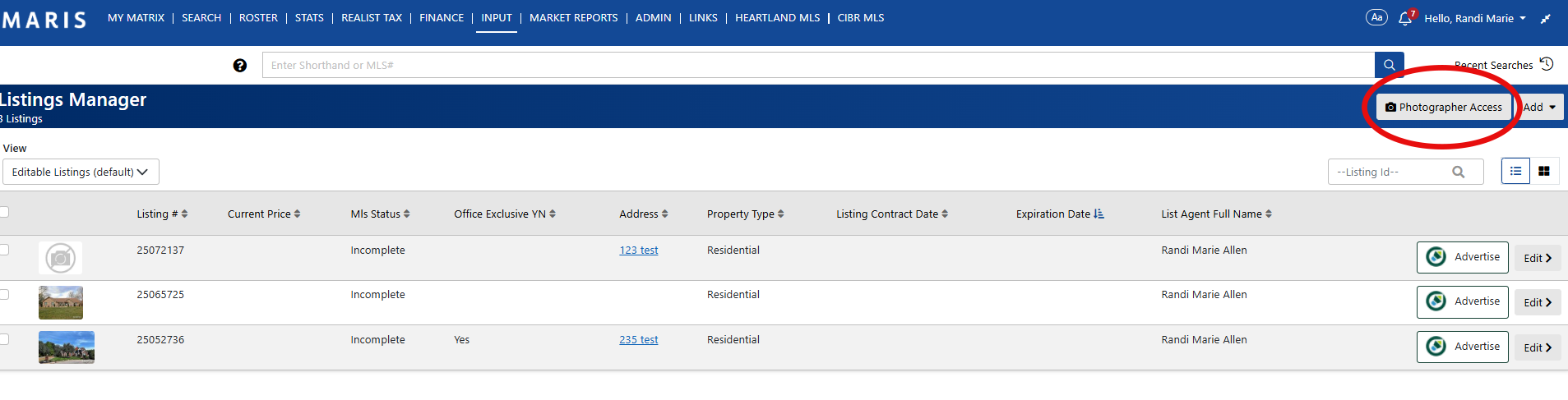
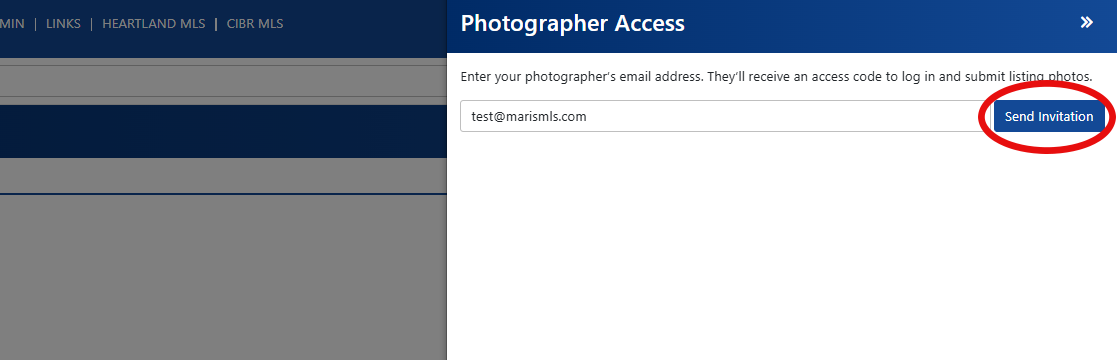
2. Enter your photographer’s email and click “Send Invitation.”
3. Your photographer then accepts and follows the link to upload photos.
Once the upload is complete, you’ll receive an email and a Matrix alert notifying you that the photos are ready for review. You can approve or reject the photos and even provide a reason for rejection to clarify your needs.
Once approved, the photos are automatically submitted to the listing—no uploading required on your part!
Check out this helpful Webinar for more information:
We hope you enjoy this great new feature!
How-to Video: For Photographers
- Will the photographer be able to edit other parts of the listing?
No, absolutely not. They will only be able to upload photos for agent review.
- Does my listing have to be incomplete for the photographers to upload photos?
No, the photographer may upload photos regardless of the listing’s status. All MLS photo rules still apply, including the requirement to upload at least one front‑exterior photo within three business days of entering the property into the MLS.
- Who is responsible for the content uploaded to the MLS?
The agent is responsible for this; the agent will be approving the photos that are uploaded.
- Will the photographer see listings other than the one they have been given access to?
No, the photographer will only be able to see specific listings they have been given access to. See above.
- I am having trouble with this system. How should I reach out for help?
Please email support@marismls.com, or call us at 314-984-9111, extension 1.